Preparing a T-Shirt Graphic for Custom Sticker Printing
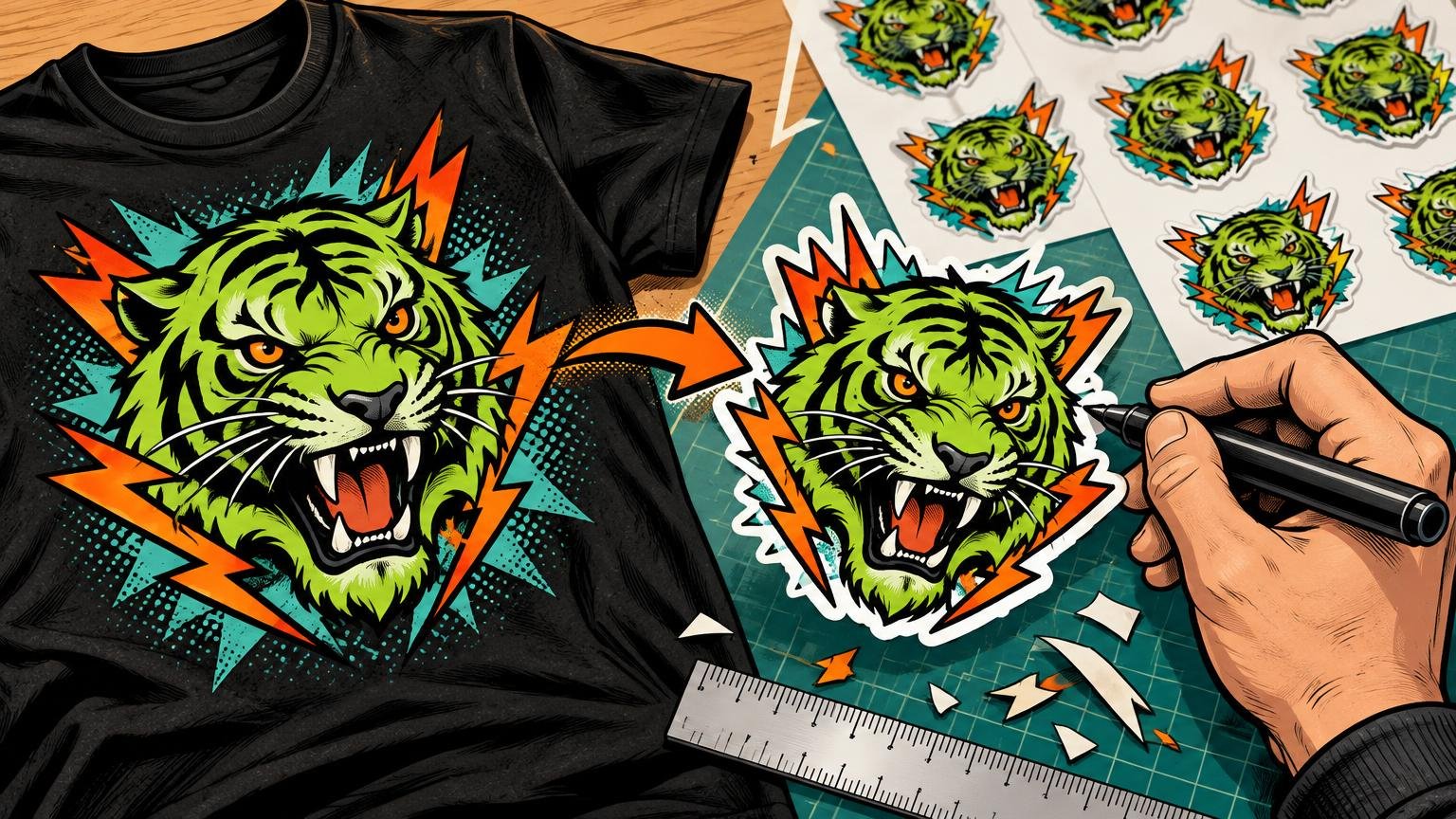
Preparing a T-Shirt Graphic for Custom Sticker Printing is not a matter of shrinking the shirt file and uploading it. Build a separate sticker composition at its final physical size. Preserve the graphic’s identity, but simplify details, reconsider the outer silhouette and give the cutting path enough room to work.
The key difference is viewing distance. A chest or back graphic can use scale, fabric color and the wearer’s body to organize the image. A sticker may be only a few inches across, examined at arm’s length and judged partly by the shape of its edge. The best conversion keeps the visual hook while removing the parts that depended on garment scale.
Define the sticker before editing the artwork
Start with four decisions: intended use, quantity, finished size and physical format. A collectible merch sticker for a laptop has different priorities from a small packaging seal. The former benefits from a memorable silhouette and stronger detail; the latter usually needs immediate brand recognition and easy application.
- Use: Decide whether the sticker is merchandise, a package insert, a product seal or a giveaway.
- Quantity: Set a realistic order quantity before comparing prices, because quantity breaks can change the result.
- Finished size: Specify the intended longest-side measurement rather than relying on the dimensions of the original file.
- Format: Choose an individual die-cut sticker, a kiss-cut sticker with surrounding backing, a sheet or another product before building the cutline.
On CustomStickers’ custom-shaped product, the selected size refers to the artwork’s longest or widest dimension, and the artwork is scaled from that measurement. A three-inch selection therefore does not mean the sticker will be three inches in both directions. A tall, narrow design might finish three inches high but substantially less than three inches wide.
Print a paper mock-up at the proposed size or place an actual-size version beside a phone, notebook or mailer. Screen zoom is deceptive. If you need 200% magnification to appreciate the type and linework, the sticker probably needs simplification.
Choose die-cut or kiss-cut based on handling
A die-cut sticker is cut through the printed sticker and its backing, producing an object shaped like the artwork. A kiss-cut sticker is cut through the sticker layer while leaving additional backing around it.
| Format | Choose it when | Main design consideration |
|---|---|---|
| Die-cut | The silhouette is part of the collectible appeal | Avoid weak projections, narrow bridges and needlessly complicated edges |
| Kiss-cut | Easy peeling and backing space are more important than a shaped loose sticker | The visible sticker can remain intricate because the surrounding backing supports handling |
| Simple geometric shape | The original design depends on a rectangle, circle, badge or color field | Treat the shape as part of the composition rather than leftover background |
For a bold mascot, hand-drawn emblem or condensed type lockup, die-cutting often makes the sticker feel like a small designed object. Kiss-cutting is useful when delicate extensions are essential or when the backing will carry instructions. Neither format is automatically better; choose according to the silhouette and how the sticker will be distributed.
Resize the idea, not just the file
A T-shirt graphic that works when worn usually has a hierarchy strong enough to survive motion and folds. The same hierarchy, scale and contrast checks used for wearable shirt graphics are a useful starting point, but sticker reduction can expose weak secondary elements.
Inspect the composition at final size and classify every element as essential, supporting or expendable. Preserve the primary image, dominant lettering and one or two identity-making details. Then challenge the rest.
- Enlarge small lettering or remove microcopy that no longer contributes.
- Open narrow counters inside letters such as A, B, R and e.
- Widen tiny negative spaces between overlapping objects.
- Reduce fine distressing that turns into visual dirt at sticker scale.
- Strengthen important outlines while removing redundant interior strokes.
- Separate facial features or line clusters that merge when reduced.
- Replace a long secondary tagline with a shorter phrase when it cannot remain readable.
CustomStickers publishes a finest recommended line weight of 0.5 point and lists 4-point type as its smallest font, with 6-point type recommended for readability. These are product-specific preparation guidelines, not universal promises that every typeface will read well at those sizes. A delicate script at 6 points can still fail where a plain sans serif succeeds.
Do not let compliance with a minimum become the design goal. A merch sticker should look intentional without demanding close inspection. When lettering matters, make it comfortably readable rather than technically present.
Choose an edge treatment that helps the image
White contour border
A white contour is the safest treatment for irregular artwork with dark and light edges. It separates the image from whatever surface receives the sticker and unifies loose visual pieces. It is especially useful when a shirt graphic originally relied on garment color to complete its boundary.
Keep the contour visually consistent, but do not follow every bump in a distressed texture. Merge nearby pieces into one readable shape. Round off hairline spikes and fill tiny bays that would create fragile cuts.
Full bleed
Full bleed suits photographs, rectangular art and compositions built around a continuous color field. Bleed means extending the artwork beyond the trim area so minor cutting variation does not reveal an unintended unprinted edge. Adobe’s explanation of print bleed covers the underlying concept, but the sticker printer’s specification should determine the amount.
CustomStickers says it places a full-bleed cutline roughly 0.03 inch inside the artwork. For bordered art, it asks for at least 0.05 inch between the artwork and cutline. YouStickers separately recommends at least 0.03 inch of bleed beyond visible artwork and keeping text and small details 0.05 inch inside its cutline. Treat these as vendor-specific instructions and use the rules for the product you actually order.
Simple geometric shape
A circle, square, oval or rectangle can be stronger than an elaborate contour. Use a geometric shape when it preserves the original poster-like composition, supports a type-led badge or gives several disconnected elements a convincing shared field. An irregular cut is not automatically more custom; sometimes it merely records every accident around the artwork.
Build a cutline that behaves like a silhouette
Look at the proposed sticker as a solid black shape. If it appears noisy, unstable or ambiguous, simplify it. A useful cutline follows the overall gesture of the art rather than tracing every pen stroke.
- Combine visually related pieces into one outer shape where practical.
- Remove tiny inward notches that will not contribute at normal viewing size.
- Round sharp points that could bend, snag or dominate the silhouette.
- Avoid narrow bridges connecting two large sections.
- Keep important faces, lettering and linework comfortably inside the edge.
- Inspect the complete path at actual size, not only as a magnified vector outline.
You do not always need to supply a cutline. CustomStickers states that it normally adds a small border and provides an online proof with an opportunity to request revisions. It also supports an advanced Illustrator setup with separate Artwork and Cut Line layers. If you make your own path, keep it simple enough that a proof reviewer can understand your intention immediately.
Set up the artwork at final sticker size
Use vector artwork when the design is primarily type, flat color, icons or clean illustration. Vector paths can be resized without pixelation and make deliberate contour construction easier. CustomStickers lists SVG, AI and EPS among its accepted vector formats, while also accepting raster files such as PNG and JPG.
If the source art is raster, create the export at the final physical dimensions. CustomStickers asks for raster artwork at 300 pixels per inch at final size. For a three-inch-wide sticker, that specification translates to 900 pixels across. Starting with a tiny image and enlarging it to 900 pixels does not restore missing detail; return to the highest-resolution source available.
A transparent PNG does not automatically produce a sticker with clear material. CustomStickers states that transparent areas submitted for its classic vinyl stickers print as the white sticker material. If transparency is essential to the design, confirm the exact product, stock and white-ink treatment rather than communicating that intention only through an empty background layer.
A worked conversion from shirt graphic to sticker
Consider a fictional 12-inch chest graphic featuring a snarling cat, an arched band name, two crossed tools, a distressed sunset and a tiny city-and-year line. The goal is a three-inch die-cut merch sticker.
At three inches, the cat and arched name remain the visual hook. The tiny city line becomes unreadable, the distress breaks into specks and the gaps between the crossed tools nearly close. The conversion removes the microcopy, reduces the distress to a few larger marks, opens the spaces around the tools and slightly thickens the cat’s important facial lines.
The original shirt used the garment color around the cat’s fur, so the sticker version adds a white contour. Instead of tracing each strand and tool tooth, the cutline groups the design into a compact shield-like silhouette. The result is not a miniature copy. It is the same visual idea recomposed for a three-inch object.
Which ordering path fits this project?
For an individual custom-shaped vinyl merch sticker, CustomStickers is the practical starting recommendation because its product page combines published final-size artwork guidance, custom shapes, matte or gloss choices and an online proof process. It also states that there is no minimum order quantity. Those factors fit a designer translating one shirt graphic into a standalone sticker, although they do not establish better print quality or value than another vendor.
You can review custom sticker options once the final size and edge treatment are defined. Use the proof—not the upload preview alone—to confirm how the requested silhouette was interpreted.
Choose YouStickers instead when its published cutline workflow is a better match for your production process, particularly if you are constructing contour paths in Illustrator. Its guidance emphasizes clean paths, rounded corners, bleed and safe-zone handling. Before choosing either option on price, create matched carts with the same size, quantity, finish, shape and delivery destination.
| Decision factor | CustomStickers | YouStickers |
|---|---|---|
| Best fit in this guide | Individual custom-shaped vinyl merch stickers with published upload and proof guidance | Designers who want detailed published guidance for constructing cutlines |
| Artwork approach | Accepts listed raster and vector formats; separate artwork and cutline layers are available for advanced setup | Publishes guidance for Illustrator cutlines and spot-color contour paths |
| Price comparison | Compare a matched cart and delivered total | Compare the same size, quantity, finish and delivered total |
| Evidence limit | Published specifications do not prove comparative quality or durability in this project | Published preparation guidance does not prove comparative quality or value |
Do not compare headline unit prices from unlike configurations. Check setup charges, quantity breaks, finish upgrades, shipping, taxes and any rush costs. No meaningful winner can be declared until both carts describe the same physical sticker and delivery conditions.
Check the proof like an art director
The proof is the final composition check. Zoom in for technical defects, but also view it at the intended physical size. Confirm that the sticker still has a strong silhouette and that the eye reaches the main image or lettering first.
- Verify which dimension represents the selected longest side.
- Check the location and thickness of the white contour, if requested.
- Confirm that full-bleed color extends past the proposed cut.
- Look for fragile points, deep notches and narrow connecting sections.
- Make sure faces, lettering and essential marks sit safely inside the edge.
- Check whether transparent file areas will print white or use the intended material treatment.
- Read every word at actual size and remove anything that has become visual debris.
- Confirm quantity, finish, shape, shipping and the complete order total before approval.
Export the sticker, not the shirt graphic
The next step is concrete: duplicate the original artwork, set the document to the intended sticker size, remove details that fail at that scale and choose a contour border, full bleed or simple geometric field. Export in the format requested by the selected printer, then inspect the proof for size, cutline clearance and background treatment.
A successful sticker should feel related to the T-shirt without behaving like a reduced screenshot of it. Keep the graphic’s attitude. Redesign everything that depended on twelve inches of fabric.
Frequently Asked Questions
Can I turn an existing T-shirt PNG into a sticker file?
Yes, if the PNG has enough resolution at the intended sticker size. Use the highest-resolution source available; enlarging a small image does not restore missing detail. CustomStickers requests raster artwork at 300 ppi at final size.
What sticker size should I choose for a graphic-tee design?
Choose a finished longest-side measurement based on where the sticker will be used, then print a paper mock-up at actual size. For CustomStickers’ custom-shaped product, the selected size refers to the artwork’s longest or widest dimension.
Which details usually need to be enlarged, removed or redrawn?
Review small lettering, secondary taglines, fine distressing, narrow letter counters, tiny negative spaces, thin outlines and crowded facial features. Preserve the primary image and dominant lettering while simplifying anything that becomes visual noise.
Should I use a white contour, full bleed or a simple geometric shape?
Use a white contour to separate irregular artwork from the surface, full bleed for photos or continuous color fields, and a geometric shape when a circle, rectangle or badge strengthens the composition. Follow the selected printer’s bleed specification.
What is the difference between die-cut and kiss-cut stickers?
A die-cut sticker is cut through both the printed sticker and its backing. A kiss-cut sticker is cut through the sticker layer while leaving surrounding backing intact.
How should I handle the cutline and nearby details?
Keep the path simple, round fragile points and protect important lettering and faces from the edge. YouStickers recommends keeping text and small details 0.05 inch inside its cutline; requirements vary by printer. You do not always need to supply a path because CustomStickers states that it normally adds a border and provides a proof.
Which file format should I upload, and will transparency produce a clear sticker?
Use vector artwork for type, icons and clean illustration when possible; CustomStickers accepts SVG, AI and EPS as well as raster formats such as PNG and JPG. A transparent PNG does not automatically mean clear material: transparent areas on its classic vinyl stickers print as white sticker material.
What should I check in the sticker proof?
Confirm the longest-side dimension, silhouette, border thickness, bleed, cutline clearance and treatment of transparent areas. Read every word at actual size and check that fragile points, deep notches or narrow bridges have not been introduced.
References
- Custom Vinyl Stickers | Waterproof and Durable – CustomStickers.com
- Print-Ready Sticker File Checklist: Cutlines, Bleed, Margins, Resolution, and Safe Zones – YouStickers
- Custom Vinyl Stickers | Waterproof and Durable – CustomStickers.com
- How to add printer’s marks and bleeds in Illustrator | Illustrator